This article outlines the process for installing and programming the NR4 NextRegister.
Installation
Remove the security pin or screw from the register and rotate and/or pull the register up to remove from the meter body.
Note: Some meter models will require additional tools to help remove the register. See manufacturer instructions, or contact NextMeters Product Support for additional tips.
Locate the slots and the post on the underside of the NextRegister.
Align the Adapter Plate and locking lever over the post.
Press down to snap the Adapter Plate flush to the NextRegister.
Rotate the Adapter Plate clockwise until the lever falls and locks into place.
Set the NextRegister onto the meter body and slowly rotate to find the alignment grooves.
Rotate 1/8th turn to secure the NextRegister to the meter.
Firmly insert the Security Pin until flush.
Note: If the Security Pin does not fit, use the security screw that came with the meter body instead.
The NextRegister’s configuration must be set for the meter body it will be paired with. If your Register was not ordered pre-configured, then you can easily configure it using your mobile device.
In the NextMeters Mobile App select Setup New Device.
Follows prompts in Mobile App to configure.
Ensure you select the correct meter body profile that is paired with your NextRegister.
Swipe your magnet next to the right side of the register.
The gear icon will display on the LCD showing it is ready to connect and the configuration will sync automatically.
When installing an NextRegister with bare-wire connection, match the color coding to the protocol of your transmitter.
3rd Party Devices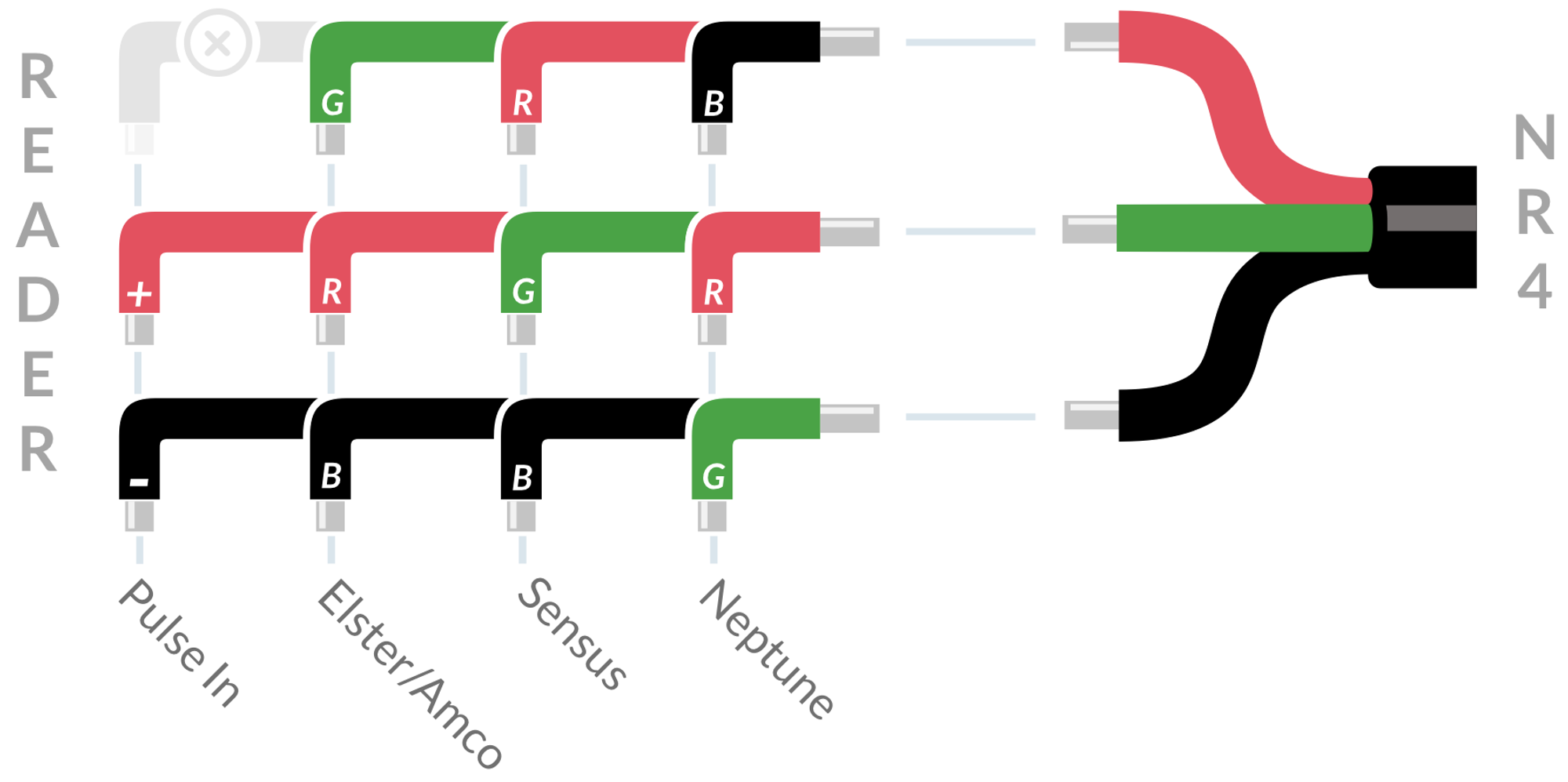
NextCentury Devices
Splice Connection
To splice the bare wire connections, use the Field Splice Kit (available separately).
- Secure the NextRegister wires, and transmitter wires using the screw terminals.
- Ensure the transmitter is able to read the NextRegister to verify the wiring.
- Snap the cover closed to seal.